


Written by Zhu Jiqian, the content discusses the process of domain name resolution.
The main goal of this article is to practically analyze how a DNS server resolves a domain name to obtain the corresponding IP address. After all, theoretical knowledge gained from reading alone remains superficial; true understanding requires practical application.
Domain Names and IP Addresses
When you type “www.baidu.com” into the browser and hit enter, the familiar Baidu search page quickly refreshes on the screen. Initially, when I first encountered the internet, I always assumed that this process involved accessing a remote server through the domain name www.baidu.com. However, that’s not the case; essentially, it’s about accessing the server remotely via an IP to retrieve resources.
This raises a clever question: why not directly use the domain name to locate the corresponding server host?
Actually, it’s possible to locate a server host via a domain name, but it’s unnecessary.
By comparing the key differences between domain names and IP addresses, it becomes clear why using a domain name isn’t necessary.
The IPv4 addresses we commonly encounter at work are typically expressed in decimal form, such as 192.168.200.111. However, within a computer, it’s actually represented in binary form. The binary representation of 192.168.200.111 is 1100 0000 1010 1000 1100 1000 0110 1111, comprising a total of 32 bits, or 32 bits, as it is widely known, 1 byte consists of 8 bits. Therefore, a 32-bit IP address has a length of just 4 bytes.
During network transmission, a 4-byte length is negligible. But what if we use a domain name instead?
Currently, the maximum length of a domain name can reach up to 63 characters, with each char character occupying 2 bytes, resulting in 126 bytes for 63 characters. It is evident that using a domain name as a transport address is resource-intensive, while an IP address of just 32 bits only takes up 4 bytes.
In fact, you can also access the corresponding website of a domain name via its IP address in a browser. However, an IP address is a long string of numbers, which is difficult to remember, and it’s even harder to understand what those numbers represent. In contrast, a domain name like Baidu’s www.baidu.com immediately makes it clear that this is Baidu’s website.
According to Baidu Encyclopedia, the purpose of designing domain names is to help users better understand.
When you type “www.baidu.com” into a browser, a domain name resolution process converts it into an IP address. This process involves a concept known as DNS. DNS stands for Domain Name System, and its function is to map domain names and IP addresses to one another. The simplest way to understand it is to compare it to a key-value map in Java, where the key is the domain name, and the value is the corresponding IP address. You can get the IP address corresponding to the domain name through map.get(domain name).
It’s worth mentioning here that an opposite yet similar concept to DNS is ARP (Address Resolution Protocol), which allows you to obtain a MAC address based on a known IP address. Of course, MAC addresses pertain to the data link layer, while DNS is an application layer concept.
Steps for Resolving a Domain Name to an IP Address
The steps to resolve a domain name to its mapped IP address include the following:
Firstly, the domain name is retrieved from the browser cache. If it can be retrieved, the corresponding IP address is directly returned; if it fails, the operating system’s local domain name resolution system will attempt to obtain it, i.e., checking whether there is a corresponding domain name mapping in the hosts file. If found, the mapped IP address is directly returned. This step is something that programmers might have done to some extent. For example, there are tutorials online about how to speed up access to the Github website on Windows. One method is to add the domain name and corresponding IP address of Github to the hosts file at C:\Windows\System32\drivers\etc\hosts, and then browsing Github to find that the speed has indeed improved. This is because local DNS resolution of the IP address reduces the need to access DNS servers remotely to obtain the domain name’s corresponding IP address, thereby speeding up the process.

Mappings stored in the hosts file typically target stable and frequently used IP addresses, such as domain names for work-related online development environments or testing environments. If the IP changes frequently or is simply unknown, configuring it in the hosts file isn’t possible, and the only option is to access a DNS server over the network.
Initially, the search begins with the local DNS server. You can verify which DNS server belongs to the local network from the system’s network configuration. By entering ipconfig /all in the command prompt and pressing Enter, you can find the “DNS Servers” field—

For example, the DNS server IP in my network is 192.168.31.1. When a browser accesses a domain name, it sends a query message to this DNS server.
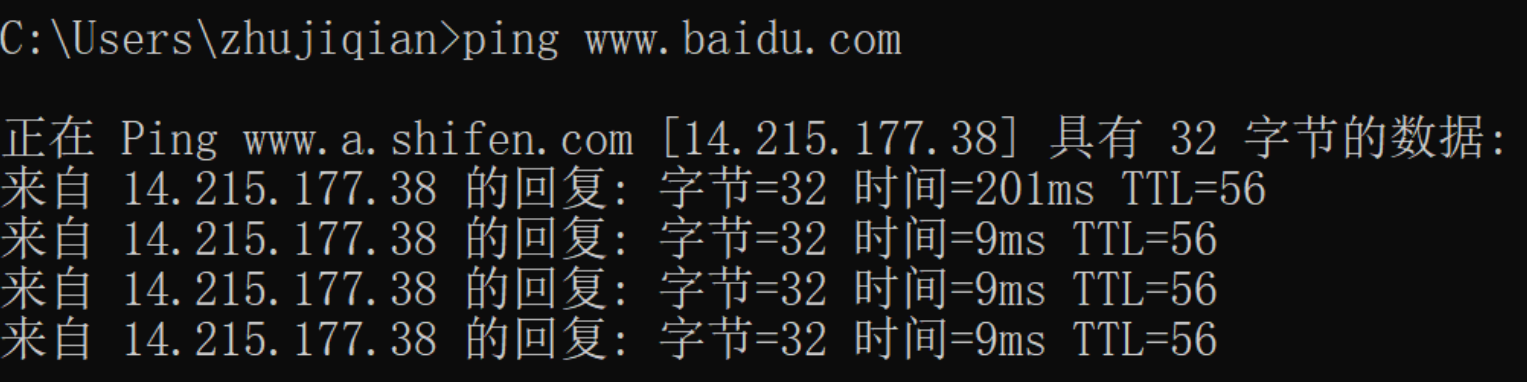
By using the packet capture software Wireshark, you can verify this. Still using the domain name www.baidu.com for the experiment, let’s first see what its corresponding IP address is by pinging it directly in a command window. The IPv4 address is 14.215.177.38
Analyzing Domain Name Resolution Network Transmission via Wireshark
Now, open the packet capture software Wireshark.
Then, enter www.baidu.com in Google Chrome and press Enter. You can see that the local IP sends a DNS protocol message to the local domain DNS server 192.168.31.1, which includes the domain name www.baidu.com, A, and a few other pieces of data like 0x1515. Then, the DNS server responds with the following information: response 0x1515 A www.baidu.com CNAME www.a.shifen.com A 14.215.177.38 A 14.215.177.39 …..

Among this information, the IP address mapped to the domain www.baidu.com is included, specifically the one returned by the earlier ping of 14.215.177.38.
In theory, if the nearest DNS server cannot resolve the domain name’s corresponding IP address, it acts as an intermediary, helping the client locate other DNS servers to see if they can find the domain name’s corresponding IP address. One key thing to understand is that any DNS server stores the IP addresses of root domain names. In the case of the domain www.baidu.com, if it can’t be resolved from the nearby DNS server 192.168.31.1, that DNS server sends the client’s inquiry request to the root domain server to ask where www.baidu.com can be resolved. The root domain server doesn’t perform resolution; instead, it acts as a guide, directing you to query the DNS server corresponding to the .com domain. If the .com domain’s DNS server also cannot resolve the domain, it continues to act as a guide, telling you to forward the request to baidu.com’s DNS server. As it passes through each server, the ultimate target DNS server eventually resolves the domain’s corresponding IP address and returns it to the client. At this point, the client can use the IP address to access the server’s resources.
In the book “How the Network Connects,” there is an illustration that intuitively expresses the process of forwarding from the nearest DNS domain to the target DNS domain during the DNS server resolution process. The illustration is straightforward, so I’ll cite it here—
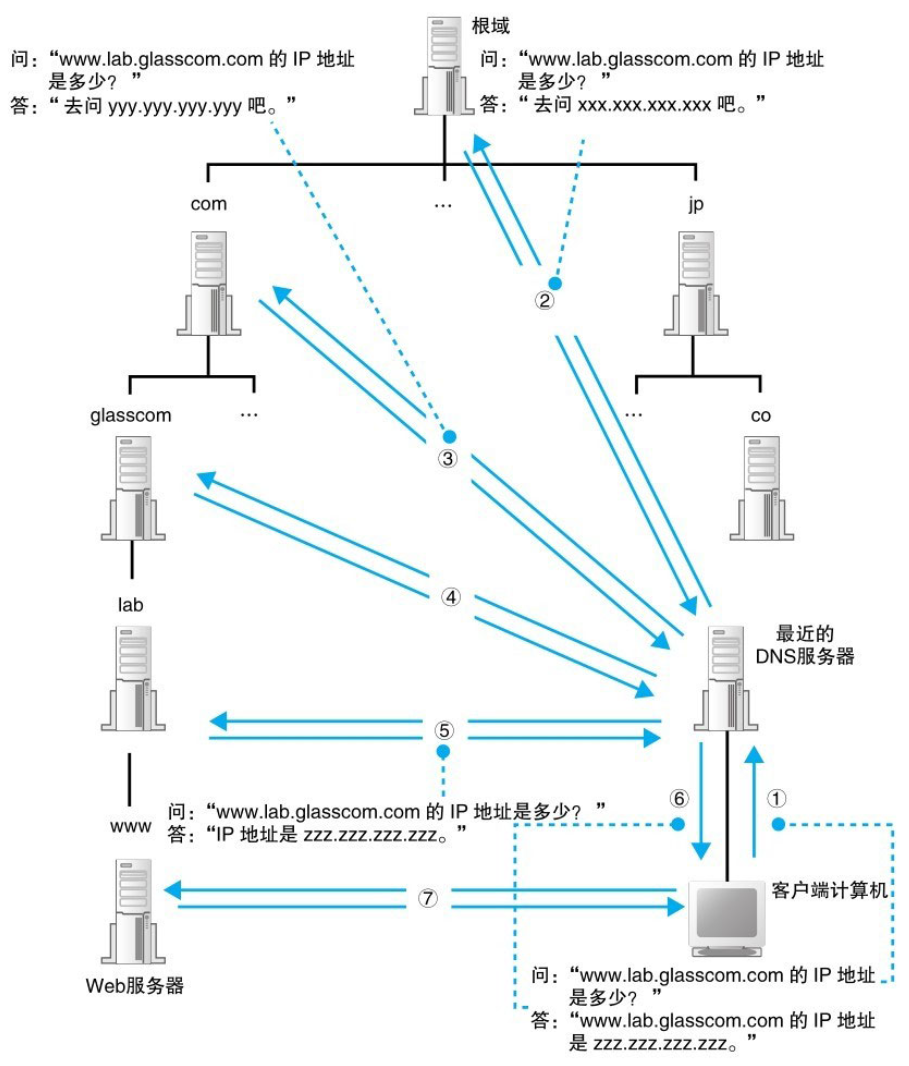
Of course, this is only theory, and the actual situation may differ somewhat.
Returning to analyzing the screenshot captured with Wireshark, one can note that the message the client sends to the DNS server includes more than just the domain name; it also has information such as A and so forth. This leads to the question: what parameters are included in a DNS protocol query request?
In the book “How the Network Connects,” there is a related explanation introducing that the query message the client sends to the DNS server contains three types of information:
Based on the above, we can specifically analyze through the detailed information column of the selected packet in Wireshark to see what query information the client sends during the DNS resolution process of www.baidu.com.
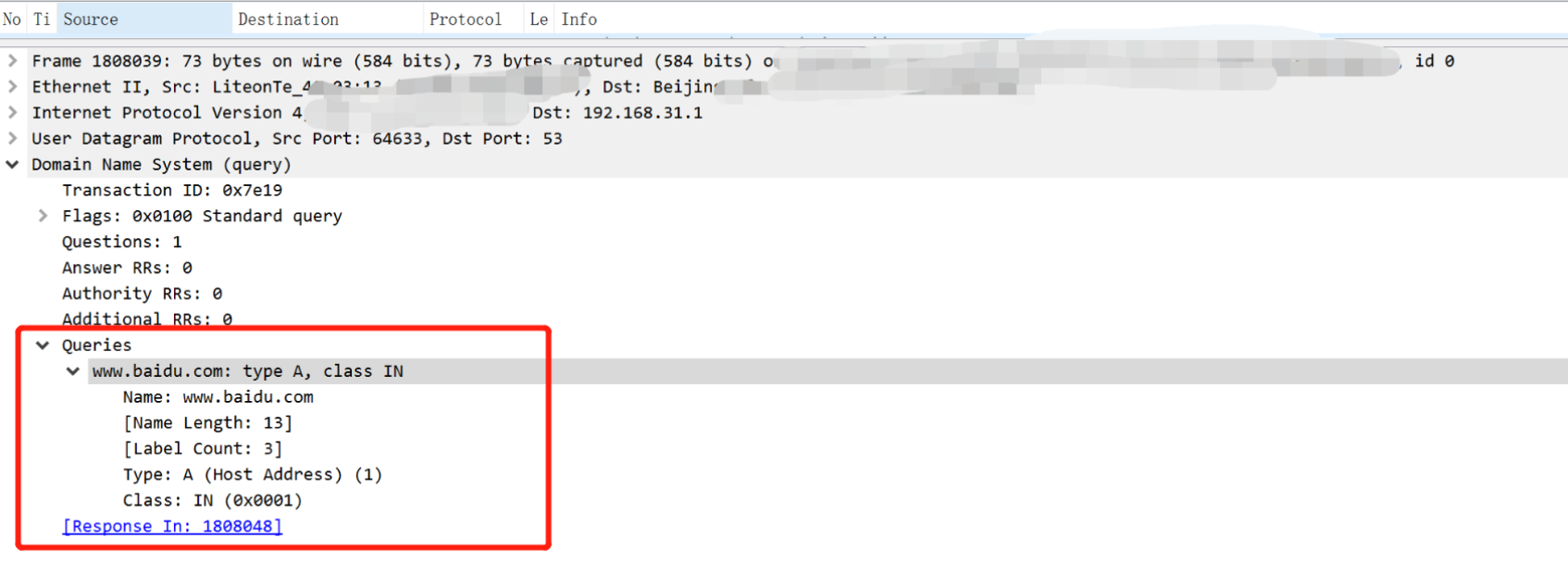
It can be seen that the DNS query information’s domain name is www.baidu.com, class is IN, and type is A, which indicates that it maps to an IP address.
This article mainly shares some personal learning and understanding of DNS resolution while conducting an in-depth analysis using actual packet captures through Wireshark to see how the local machine sends the DNS protocol to the DNS server to obtain the IP address corresponding to the accessed domain name. Hopefully, this will provide you with some insights.
Feel free to follow our WeChat official account—