


With the development of real-time audio and video communication (such as…)WebRTCWith the widespread adoption of NAT (Network Address Translation) traversal technology, it has become crucial for ensuring peer-to-peer connections. As a core component of NAT traversal, the STUN (Session Traversal Utilities for NAT) protocol plays a vital role in helping clients discover their public IP address and ports. Recently, Unicorn Network Analyzer officially announced support for STUN protocol decoding, which…Network EngineerThis greatly facilitates security analysts in troubleshooting complex network connectivity issues. This article will delve into the principles of the STUN protocol and detail how to use Unicorn Network Analyzer for efficient packet capture and analysis.
I. What is the STUN protocol?
In an ideal network environment, if both devices have independent public IP addresses, they can directly establish a P2P (peer-to-peer) connection. However, in reality, most devices are hidden behind routers or enterprise firewalls, using private IP addresses.IP addressWhile NAT technology solves the problem of IPv4 address shortage, it also blocks connections initiated by external devices.
The STUN protocol was created to address this pain point. Its core function is very simple: to tell the client “what your public IP address and port are.” When a client behind a NAT sends a request to a STUN server on the public network, the STUN server resolves the source IP and source port of the request and returns them as a response to the client.
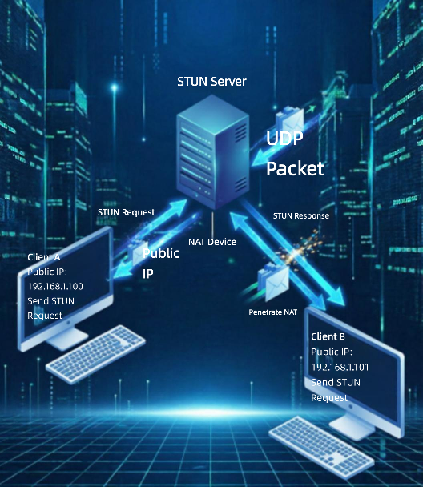
The role of STUN in NAT traversal
After obtaining the public network mapping information, the client can exchange this information with the other end of the communication through a signaling server . Subsequently, both parties simultaneously send UDP packets to each other’s public IP address and port. Although the initial packets may be dropped by the NAT, outbound traffic will prompt their respective NAT devices to open temporary mapped ports (i.e., “UDP hole punching”). Once both NATs have established “holes,” subsequent P2P packets can flow freely.
Limitations of STUN
It’s important to note that STUN is not a panacea. In a Symmetric NAT environment, the router assigns a new public port to each new external target. This means the port returned by the STUN server differs from the port actually used by the client to connect to the peer, causing UDP hole punching to fail. Furthermore, strict enterprise firewalls may directly block inbound UDP traffic. In these scenarios, it’s typically necessary to degrade to using a TURN (relay) server to forward data.
II. Decoding STUN using Unicorn Network Analyzer
Unicorn Network Analyzer’s support for the STUN protocol makes the previously obscure…hexadecimalThe messages become intuitive and readable. The following is a practical workflow for STUN traffic analysis using CentOS tcpdump and Unicorn.
1. Data collectionWith seamless import
First, we need to capture the raw data packets containing STUN interactions on the server or test machine .CentOSIn the terminal, you can use the following command to capture packets:
tcpdump -i eth0 -w stun_capture.pcap
AI writes code
Packet captureOnce completed, the generated .pcapfile is transferred to the workstation running Unicorn Network Analyzer. Thanks to its highly compatible parsing engine, Unicorn can automatically recognize the standard PCAP format generated by tcpdump, achieving loading in seconds without any manual transcoding.
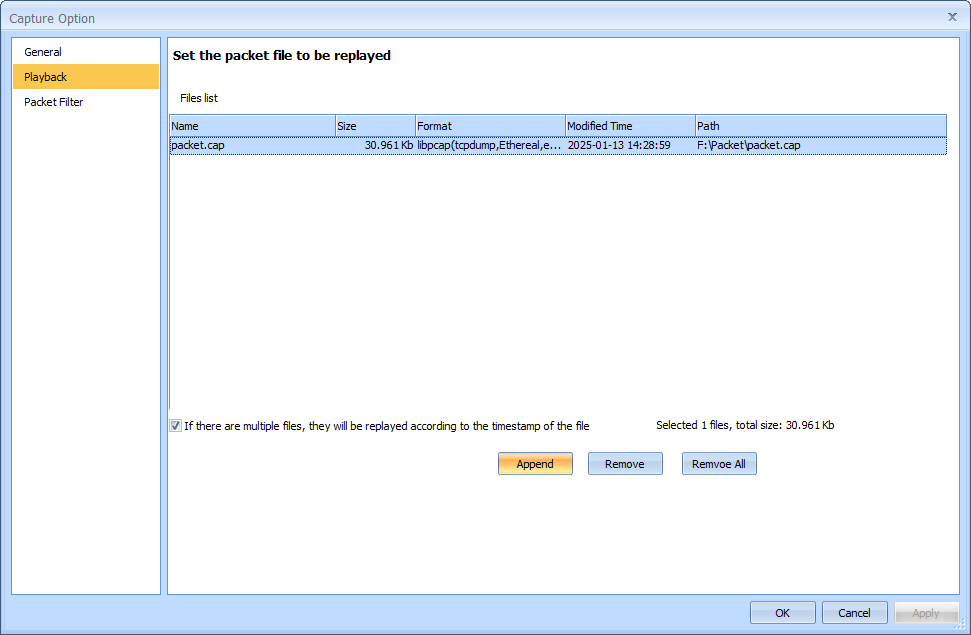
2. Visual Reconstruction of the Protocol Stack
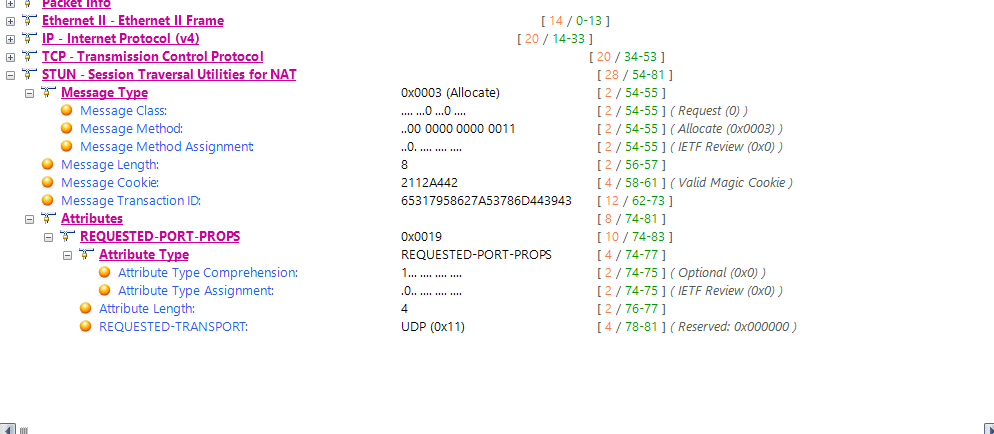
After importing data packets, Unicorn’s core advantage lies in its powerful protocol decoding capabilities. Faced with complex network traffic, the software can automatically extract Ethernet frames, IP headers, and UDP transport layer information, accurately locate application layer STUN packets, and transform obscure hexadecimal data into a structured protocol tree.
When analyzing STUN messages, you can clearly see the following key fields:
Message Type : such as Binding Request or Binding Response.
Transaction ID : A unique identifier used to match requests and responses.
XOR-MAPPED-ADDRESS / MAPPED-ADDRESS : This is the core of STUN decoding. Unicorn will directly resolve the real public IP address and port assigned to the client by NAT.
3. Interactive Flow Tracing and Anomaly Localization
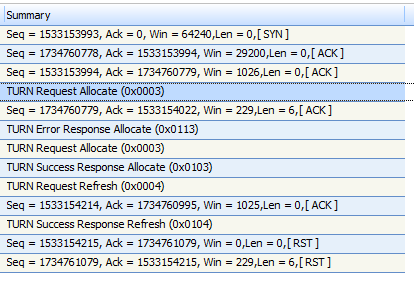
For massive amounts of packet capture data, Unicorn offers efficient stream reconstruction capabilities. When troubleshooting WebRTC connection failures or timeouts, analysts can restore the complete STUN interaction timeline with a single click by selecting a specific UDP session.
For example, you can clearly observe the time it takes for the client to send a Binding Request, the response latency of the STUN server, and the packet sending and receiving logic during the subsequent UDP hole punching phase. If the public IP returned in the STUN response does not match the expectation, or if you observe frequent port changes under symmetric NAT, Unicorn’s intuitive field-level parsing can help you quickly locate abnormal packets, thereby determining whether you need to switch to a TURN relay solution.
Conclusion
Unicorn Network Analyzer’s support for the STUN protocol is essentially a perfect combination of “efficient command-line data capture” and “deep graphical analysis.” It not only retains tcpdump’s lightweight and stable packet capture advantages on the server side, but also, through a powerful decoding engine, gives raw NAT traversal packets a deeper level of visual value. For network and security professionals seeking ultimate troubleshooting efficiency, this combination is undoubtedly a powerful tool for tackling the challenges of complex real-time communication networks.