

Crontab is a well-known scheduling tool on Linux, and in Ansible, the cron module is used to manage crontab and environment variable entries.
- This module allows creating, updating, or deleting environment variables and named crontab entries.
- When managing crontab jobs, the module includes a line where the crontab entry description C(“#Ansible:”) corresponds to the “name” parameter passed to the module. This is used for future Ansible/module calls to locate/check the state.
- The “name” parameter should be unique, and changing the “name” value will result in creating a new cron task (or deleting others).
- When managing environment variables, no comment lines are added. However, the module uses the “name” parameter to locate the environment variable definition line when it needs to check the state.
Let’s first look at the imported modules.
 import os
import platform
import pwd
import re
import sys
import tempfile

from ansible.module_utils.basic import AnsibleModule
from ansible.module_utils.common.text.converters import to_bytes, to_native
from ansible.module_utils.six.moves import shlex_quote


class CronTabError(Exception):
    pass
The `platform` module provides many methods to retrieve operating system information, and the other modules are also commonly used. Next, the `CronTabError` exception class is defined.
 class CronTab(object):

    def __init__(self, module, user=None, cron_file=None):
        self.module = module
        self.user = user
        self.root = (os.getuid() == 0)
        self.lines = None
        self.ansible = "#Ansible: "
        self.n_existing = ''
        self.cron_cmd = self.module.get_bin_path('crontab', required=True)

        if cron_file:
            if os.path.isabs(cron_file):
                self.cron_file = cron_file
                self.b_cron_file = to_bytes(cron_file, errors='surrogate_or_strict')
            else:
                self.cron_file = os.path.join('/etc/cron.d', cron_file)
                self.b_cron_file = os.path.join(b'/etc/cron.d', to_bytes(cron_file, errors='surrogate_or_strict'))
        else:
            self.cron_file = None

        self.read()
The `CronTab` class is defined, and a `CronTab` object writes to time-based crontab files. The constructor takes two parameters: `user` (the crontab user, defaulting to the current user) and `cron_file` (a cron file under `/etc/cron.d` or an absolute path). It then calls the `read()` method to read the crontab from the system.
 def read(self):
    self.lines = []
    if self.cron_file:
        try:
            f = open(self.b_cron_file, 'rb')
            self.n_existing = to_native(f.read(), errors='surrogate_or_strict')
            self.lines = self.n_existing.splitlines()
            f.close()
        except IOError:
            return
        except Exception:
            raise CronTabError("Unexpected error:", sys.exc_info()[0])
    else:
        (rc, out, err) = self.module.run_command(self._read_user_execute(), use_unsafe_shell=True)

        if rc != 0 and rc != 1:
            raise CronTabError("Unable to read crontab")

        self.n_existing = out

        lines = out.splitlines()
        count = 0
        for l in lines:
            if count >  2 or (not re.match(r'# DO NOT EDIT THIS FILE - edit the master and reinstall.', l) and
                             not re.match(r'# \(/tmp/.*installed on.*\)', l) and
                             not re.match(r'# \(.*version.*\)', l)):
                self.lines.append(l)
            else:
                pattern = re.escape(l) + '[\r\n]?'
                self.n_existing = re.sub(pattern, '', self.n_existing, 1)
            count += 1
The `lines` list is initialized as empty, and the cron file is read. If an `IOError` is raised (indicating the cron file does not exist), it returns empty. For other exceptions, the previously defined `CronTabError` is raised. `sys.exc_info()` is used to retrieve exception information.
During debugging, simply knowing the exception type is often insufficient. More detailed exception information is needed to resolve issues. There are two ways to capture more detailed exception information:
- Using the `exc_info` method from the `sys` module;
- Using related functions from the `traceback` module.
The `exc_info()` method returns the current exception information as a tuple containing three elements: `type`, `value`, and `traceback`. Their meanings are:
- `type`: The name of the exception type, which is a subclass of `BaseException`.
- `value`: The captured exception instance.
- `traceback`: A traceback object.
When `cron_file` is `None`, the `_read_user_execute()` method is executed as a command. The return code is checked, where non-zero and non-one values indicate an error. A return code of 1 means no jobs exist. If the crontab cannot be read, a `CronTabError` is raised. The command output is stored in `n_existing`.
The content of the crontab file is then processed line by line. When the line count exceeds 3 or specific comment lines are not matched, it is considered a crontab task. Otherwise, the line is escaped using `re.escape` and replaced with an empty string using `re.sub`.
The `_read_user_execute` method is called in the above code.
     def _read_user_execute(self):
        user = ''
        if self.user:
            if platform.system() == 'SunOS':
                return "su %s -c '%s -l'" % (shlex_quote(self.user), shlex_quote(self.cron_cmd))
            elif platform.system() == 'AIX':
                return "%s -l %s" % (shlex_quote(self.cron_cmd), shlex_quote(self.user))
            elif platform.system() == 'HP-UX':
                return "%s %s %s" % (self.cron_cmd, '-l', shlex_quote(self.user))
            elif pwd.getpwuid(os.getuid())[0] != self.user:
                user = '-u %s' % shlex_quote(self.user)
        return "%s %s %s" % (self.cron_cmd, user, '-l')
This method returns the command line used to read the crontab. It generates the appropriate command based on different Linux operating systems.
     def is_empty(self):
        if len(self.lines) == 0:
            return True
        else:
            return False
This is an example of poorly written code, which seems unprofessional and resembles something written by a beginner.
 def is_empty(self):
    return len(self.lines) == 0
Wouldn’t it be better to write it like this? These two approaches are entirely equivalent!
def write(self, backup_file=None):
    if backup_file:
        fileh = open(backup_file, 'wb')
    elif self.cron_file:
        fileh = open(self.b_cron_file, 'wb')
    else:
        filed, path = tempfile.mkstemp(prefix='crontab')
        os.chmod(path, int('0644', 8))
        fileh = os.fdopen(filed, 'wb')

    fileh.write(to_bytes(self.render()))
    fileh.close()

    if backup_file:
        return

    if not self.cron_file:
        (rc, out, err) = self.module.run_command(self._write_execute(path), use_unsafe_shell=True)
        os.unlink(path)

        if rc != 0:
            self.module.fail_json(msg=err)

    if self.module.selinux_enabled() and self.cron_file:
        self.module.set_default_selinux_context(self.cron_file, False)
Writes the crontab to the system, saving all information. This primarily involves file I/O operations. If cron_file is not specified, the method uses the command execution approach by invoking _write_execute, which returns the appropriate operating system crontab command. It also checks whether SELinux is enabled.
def _write_execute(self, path):
    user = ''
    if self.user:
        if platform.system() in ['SunOS', 'HP-UX', 'AIX']:
            return "chown %s %s ; su '%s' -c '%s %s'" % (
                shlex_quote(self.user), shlex_quote(path), shlex_quote(self.user), self.cron_cmd, shlex_quote(path))
        elif pwd.getpwuid(os.getuid())[0] != self.user:
            user = '-u %s' % shlex_quote(self.user)
    return "%s %s %s" % (self.cron_cmd, user, shlex_quote(path))
Returns the command-line string used to write the crontab. This is similar to the earlier _read_user_execute method.
def render(self):
    crons = []
    for cron in self.lines:
        crons.append(cron)

    result = '\n'.join(crons)
    if result:
        result = result.rstrip('\r\n') + '\n'
    return result
Renders the crontab as it would appear in the crontab file. Essentially, it joins each line in self.lines with a newline character.
def do_comment(self, name):
    return "%s%s" % (self.ansible, name)


def add_job(self, name, job):
    self.lines.append(self.do_comment(name))

    self.lines.append("%s" % (job))


def update_job(self, name, job):
    return self._update_job(name, job, self.do_add_job)


def do_add_job(self, lines, comment, job):
    lines.append(comment)

    lines.append("%s" % (job))


def remove_job(self, name):
    return self._update_job(name, "", self.do_remove_job)


def do_remove_job(self, lines, comment, job):
    return None
These methods are straightforward and handle adding or removing jobs in the crontab, as well as adding comments. For example, update_job and remove_job are wrappers around _update_job, passing different parameters.
def add_env(self, decl, insertafter=None, insertbefore=None):
    if not (insertafter or insertbefore):
        self.lines.insert(0, decl)
        return

    if insertafter:
        other_name = insertafter
    elif insertbefore:
        other_name = insertbefore
    other_decl = self.find_env(other_name)
    if len(other_decl) >  0:
        if insertafter:
            index = other_decl[0] + 1
        elif insertbefore:
            index = other_decl[0]
        self.lines.insert(index, decl)
        return

    self.module.fail_json(msg="Variable named '%s' not found." % other_name)

def update_env(self, name, decl):
    return self._update_env(name, decl, self.do_add_env)

def do_add_env(self, lines, decl):
    lines.append(decl)

def remove_env(self, name):
    return self._update_env(name, '', self.do_remove_env)

def do_remove_env(self, lines, decl):
    return None
What is this env? Let’s first look at a standard crontab file. At the beginning of the file, it specifies the shell and PATH being used.
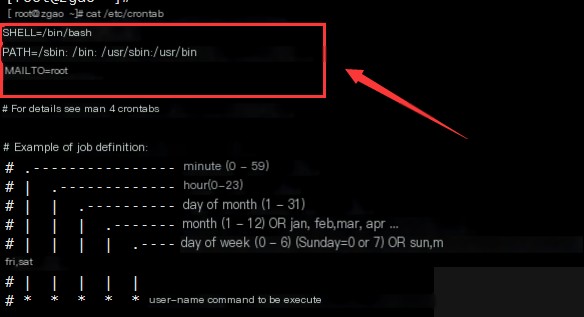
The add_env method supports two optional parameters: insertafter and insertbefore. If both are None, the declaration is inserted at the beginning of the file (index 0). If either parameter is provided, it assigns the value to other_name and calls find_env to locate the corresponding environment variable. The find_env method returns a two-element list, so the index of the match is at position 0. Depending on whether the insertion is before or after, the index is adjusted (+1 for after) and the declaration is inserted.
As for update_env and remove_env, they still call _update_env with the appropriate parameters.
def find_env(self, name):
    for index, l in enumerate(self.lines):
        if re.match(r'^%s=' % name, l):
            return [index, l]

    return []

def _update_job(self, name, job, addlinesfunction):
    ansiblename = self.do_comment(name)
    newlines = []
    comment = None

    for l in self.lines:
        if comment is not None:
            addlinesfunction(newlines, comment, job)
            comment = None
        elif l == ansiblename:
            comment = l
        else:
            newlines.append(l)

    self.lines = newlines

    if len(newlines) == 0:
        return True
    else:
        return False
The find_env method iterates through self.lines to find a match using a regular expression, returning the index and content of the match. Now, looking at _update_env‘s addenvfunction parameter, we can see that it is actually a function being passed as an argument—a callback function.
def remove_job_file(self):
    try:
        os.unlink(self.cron_file)
        return True
    except OSError:
        return False
    except Exception:
        raise CronTabError("Unexpected error:", sys.exc_info()[0])


def find_job(self, name, job=None):
    comment = None
    for l in self.lines:
        if comment is not None:
            if comment == name:
                return [comment, l]
            else:
                comment = None
        elif re.match(r'%s' % self.ansible, l):
            comment = re.sub(r'%s' % self.ansible, '', l)

    if job:
        for i, l in enumerate(self.lines):
            if l == job:
                if not re.match(r'%s' % self.ansible, self.lines[i - 1]):
                    self.lines.insert(i, self.do_comment(name))
                    return [self.lines[i], l, True]

                elif name and self.lines[i - 1] == self.do_comment(None):
                    self.lines[i - 1] = self.do_comment(name)
                    return [self.lines[i - 1], l, True]

    return []
The remove_job_file function, as the name suggests, deletes the crontab file. If the cron file does not exist, it returns False. It attempts to locate a job by searching for comments starting with “Ansible:”. These comments are generated by Ansible’s cron module and act as markers. When a match is found, the “Ansible:” prefix is replaced with an empty string.
Otherwise, it tries to find the job through an exact match. Since some crontabs may not be written by the cron module, there might be no leading “Ansible:” header. In such cases, a header is inserted. If there is a blank “Ansible:” header and the job has a name, the header is updated.
def get_cron_job(self, minute, hour, day, month, weekday, job, special, disabled):
    # Normalize any leading/trailing newlines (ansible/ansible-modules-core#3791)
    job = job.strip('\r\n')

    if disabled:
        disable_prefix = '#'
    else:
        disable_prefix = ''

    if special:
        if self.cron_file:
            return "%s@%s %s %s" % (disable_prefix, special, self.user, job)
        else:
            return "%s@%s %s" % (disable_prefix, special, job)
    else:
        if self.cron_file:
            return "%s%s %s %s %s %s %s %s" % (disable_prefix, minute, hour, day, month, weekday, self.user, job)
        else:
            return "%s%s %s %s %s %s %s" % (disable_prefix, minute, hour, day, month, weekday, job)

def get_jobnames(self):
    jobnames = []

    for l in self.lines:
        if re.match(r'%s' % self.ansible, l):
            jobnames.append(re.sub(r'%s' % self.ansible, '', l))

    return jobnames

def get_envnames(self):
    envnames = []

    for l in self.lines:
        if re.match(r'^\S+=', l):
            envnames.append(l.split('=')[0])

    return envnames
In the get_cron_job function, any leading or trailing newlines are normalized. This function formats the crontab entry based on the minute, hour, day, month, and weekday fields. The get_jobnames function retrieves the names of the jobs. It uses re.sub(r'%s' % self.ansible, '', l) to replace “#Ansible:” with an empty string, leaving only the job name. However, it’s worth questioning whether using re.sub is necessary, as simple string slicing might achieve the same result. The get_envnames function operates similarly to get_jobnames, but it extracts environment variable names instead.
Next, let’s examine the main function. The instantiation of the Ansible module object and parameter assignment will not be discussed in detail.
changed = False
res_args = dict()
warnings = list()

if cron_file:
    cron_file_basename = os.path.basename(cron_file)
    if not re.search(r'^[A-Z0-9_-]+
The script first retrieves the filename of cron_file and uses a regular expression to check if it adheres to the naming convention. The os.umask(int('022', 8)) ensures that any generated files can only be written by the owning user. The permission 022 corresponds to 644, which is primarily related to the cron_file option. Then, the crontab object is instantiated, and parameters are validated.
- The
'name'parameter will be required in future versions. - The
'reboot'parameter will be deprecated. Users are advised to use the'special_time'option instead.
if module._diff:
    diff = dict()
    diff['before'] = crontab.n_existing
    if crontab.cron_file:
        diff['before_header'] = crontab.cron_file
    else:
        if crontab.user:
            diff['before_header'] = 'crontab for user "%s"' % crontab.user
        else:
            diff['before_header'] = 'crontab'

if env and not name:
    module.fail_json(msg="You must specify 'name' while working with environment variables (env=yes)")

if (special_time or reboot) and \
   (True in [(x != '*') for x in [minute, hour, day, month, weekday]]):
    module.fail_json(msg="You must specify time and date fields or special time.")

if (special_time or reboot) and platform.system() == 'SunOS':
    module.fail_json(msg="Solaris does not support special_time=... or @reboot")

if cron_file and do_install:
    if not user:
        module.fail_json(msg="To use cron_file=... parameter you must specify user=... as well")

if job is None and do_install:
    module.fail_json(msg="You must specify 'job' to install a new cron job or variable")

if (insertafter or insertbefore) and not env and do_install:
    module.fail_json(msg="Insertafter and insertbefore parameters are valid only with env=yes")

if reboot:
    special_time = "reboot"
The diff dictionary stores changes made to the crontab before and after execution. The script then validates user input, such as ensuring that special_time is not used on Solaris systems, as it is unsupported.
    if backup and not module.check_mode:
        (backuph, backup_file) = tempfile.mkstemp(prefix='crontab')
        crontab.write(backup_file)

    if crontab.cron_file and not do_install:
        if module._diff:
            diff['after'] = ''
            diff['after_header'] = '/dev/null'
        else:
            diff = dict()
        if module.check_mode:
            changed = os.path.isfile(crontab.cron_file)
        else:
            changed = crontab.remove_job_file()
        module.exit_json(changed=changed, cron_file=cron_file, state=state, diff=diff)

    if env:
        if ' ' in name:
            module.fail_json(msg="Invalid name for environment variable")
        decl = '%s="%s"' % (name, job)
        old_decl = crontab.find_env(name)

        if do_install:
            if len(old_decl) == 0:
                crontab.add_env(decl, insertafter, insertbefore)
                changed = True
            if len(old_decl) >  0 and old_decl[1] != decl:
                crontab.update_env(name, decl)
                changed = True
        else:
            if len(old_decl) >  0:
                crontab.remove_env(name)
                changed = True
If necessary, make a backup before making changes. The do_install parameter indicates whether the current operation is to add or remove a job, with the default being present. Additionally, there are some method calls to the crontab object, which were analyzed earlier in the class methods. Each job is also validated to ensure it does not contain newline characters.
Here’s a quick explanation of the differences between \r, \n, and \r\n:
On Windows:
\r(Carriage Return): Moves the cursor to the beginning of the current line without advancing to the next line. If additional output is written, it will overwrite the existing content on that line.\n(Line Feed): Moves the cursor to the next line without returning to the beginning of the line.
In Unix systems, the end of each line is marked with a “\n” (Line Feed). In Windows systems, the end of each line is marked with “\r\n” (Carriage Return + Line Feed). In older Mac systems, the end of each line is marked with “\r” (Carriage Return). A direct consequence of this is that files created in Unix/Mac systems may appear as a single line when opened in Windows, while files created in Windows may display an extra ^M character at the end of each line when opened in Unix/Mac systems.
    if not changed and crontab.n_existing != '':
        if not (crontab.n_existing.endswith('\r') or crontab.n_existing.endswith('\n')):
            changed = True

    res_args = dict(
        jobs=crontab.get_jobnames(),
        envs=crontab.get_envnames(),
        warnings=warnings,
        changed=changed
    )

    if changed:
        if not module.check_mode:
            crontab.write()
        if module._diff:
            diff['after'] = crontab.render()
            if crontab.cron_file:
                diff['after_header'] = crontab.cron_file
            else:
                if crontab.user:
                    diff['after_header'] = 'crontab for user "%s"' % crontab.user
                else:
                    diff['after_header'] = 'crontab'

            res_args['diff'] = diff

    if backup and not module.check_mode:
        if changed:
            res_args['backup_file'] = backup_file
        else:
            os.unlink(backup_file)

    if cron_file:
        res_args['cron_file'] = cron_file

    module.exit_json(**res_args)

    module.exit_json(msg="Unable to execute cron task.")
No changes were made to the environment variables or jobs, but the existing crontab requires proper line termination. Backups are only retained if the crontab or cron file has been modified.
That concludes this explanation. Honestly, after reviewing the code for this cron module, I feel the code quality is not particularly high. When studying code from open-source projects, it’s important to approach it with a critical mindset. Think about why it’s written this way or whether you can come up with a better solution. This will help you improve more quickly.