


1. Problem Overview
During routine usage, I encountered a connection issue while using the remote control software AnyViewer. The client was unable to establish a stable remote control session, as the connection to the server was frequently interrupted.
From the user perspective, the symptoms were:
- The control session could not be established reliably
- The connection was repeatedly dropped shortly after being created
- The client application reported socket errors, specifically error 10054 (WSAECONNRESET)
This error typically indicates that the connection was forcibly closed by the peer. However, the high frequency of disconnections suggested a deeper issue beyond normal application-layer behavior.
To investigate, I performed a systematic debugging process:
- Reviewed client-side networking code
- Captured TCP traffic using packet analysis tools
- Correlated application errors with network-level behavior
A critical finding quickly emerged:
❗ The TCP reset (RST) packets were sent by the client itself, not the server.
This shifted the investigation toward TCP internals, retransmission behavior, and network reliability.
2. Key Observations from Packet Capture
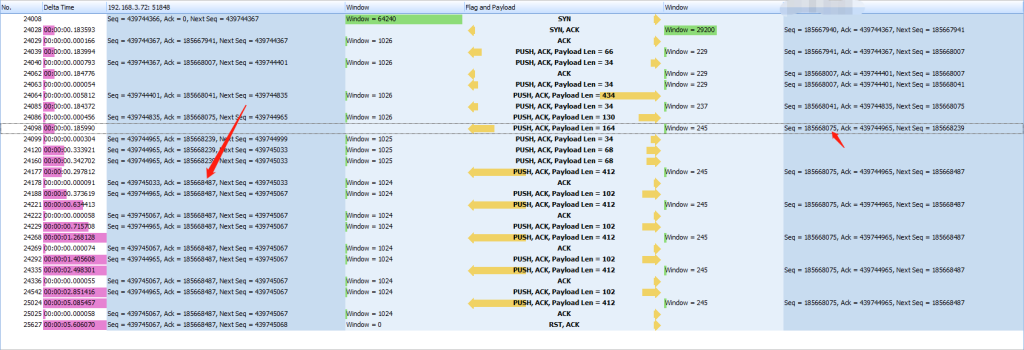
From the captured traffic, several critical patterns emerge:
2.1 Repeated Transmission of the Same Sequence Number
The server repeatedly sends packets with the same sequence number:
Seq = 185668075 (retransmitted many times)
This indicates:
The server believes this segment was not acknowledged and is continuously retransmitting it.
2.2 ACK Stalls on the Client Side
The client keeps responding with the same acknowledgment number:
Ack = 439744965 (no progress)
This behavior implies:
- The client is waiting for a missing segment
- TCP acknowledgment cannot advance because data must be processed in order
2.3 High Volume of Retransmissions
A large number of retransmissions are observed, confirming:
The connection has entered a loss recovery state
2.4 Receive Window Remains Normal Initially
The client’s receive window stays around:
Window ≈ 1024
This suggests:
- The client is not overloaded
- The issue is not caused by application-level slowness
2.5 Final Connection Reset (RST)
Eventually, the client sends:
RST, ACK
This means:
The client TCP stack determines that the connection is no longer recoverable and forcibly terminates it.
3. Reconstruction of the TCP Failure Scenario
Based on the evidence, the failure can be reconstructed step by step:
Step 1: A Critical Packet Is Lost
The server sends:
Seq = 185668075
But this packet is:
❌ Lost in transit or not accepted by the client
Step 2: Out-of-Order Data Arrives
Subsequent packets may arrive successfully:
Seq = 185668200, 185668300, ...
However:
- TCP requires in-order delivery
- The client cannot process later segments without the missing one
Step 3: ACK Becomes Stuck
The client repeatedly sends:
ACK = 439744965
This indicates:
“I am still waiting for the missing segment.”
Step 4: Server Enters Retransmission Loop
The server repeatedly retransmits:
Seq = 185668075
But the client still does not acknowledge it.
Step 5: Buffer Pressure and TCP Deadlock
As more out-of-order data accumulates:
- Receive buffers begin to fill
- Window size may shrink
- Progress halts completely
Step 6: Client Aborts the Connection
After repeated failures and timeout conditions:
The Windows TCP stack sends an RST to terminate the connection.
4. Root Cause Analysis
This behavior is not caused by application logic or explicit socket closure. The root cause lies in network-level packet delivery failure.
Most Likely Cause (≈80%)
Packet loss combined with retransmission failure
- A critical segment is lost
- Retransmissions also fail or are delayed
- TCP cannot recover
Possible Contributing Factors
1. Network Instability
- Cross-region latency (e.g., long-distance routing)
- Packet loss or jitter
- Congested links
2. Intermediate Devices
- NAT gateways
- Firewalls
- Traffic shaping or QoS policies
3. Packet Reordering
- Severe out-of-order delivery
- Missing key segment blocks the entire stream
4. Client-Side Packet Drop (Less Likely)
- Checksum errors
- Window validation failure
- NIC offload or driver issues
5. Key Insight
This case can be summarized with a simple rule:
Repeated retransmission of the same sequence number + stagnant ACK = the segment is not being accepted by the receiver
6. Why This Leads to Error 10054
Error 10054 occurs because:
- The client TCP stack detects unrecoverable transmission failure
- It forcibly resets the connection using RST
- The application receives this as a connection reset error
7. Verification Steps
To confirm the root cause, the following checks are recommended:
7.1 Capture Traffic on Both Ends
- Verify whether the problematic sequence (
185668075) reaches the client
7.2 Check for Duplicate ACKs
- Indicates missing segment
7.3 Analyze Retransmission Patterns
- Fast retransmission vs timeout retransmission
7.4 Test Network Quality
- Packet loss (ping)
- Throughput and jitter (iperf)
7.5 Disable NIC Offloading (Windows)
- Large Send Offload (LSO)
- Checksum Offload
8. Conclusion
The issue is fundamentally a TCP-level stall caused by packet loss and failed recovery:
A critical segment is repeatedly retransmitted but never acknowledged, causing ACK stagnation, retransmission loops, and ultimately a client-side connection reset (RST).
9. Engineering Recommendation
For real-time or high-throughput applications (such as AV streaming):
❗ TCP is not ideal due to head-of-line blocking.
Consider:
- UDP-based transport (e.g., RTP)
- Forward Error Correction (FEC)
- Adaptive bitrate control
If needed, this scenario can be further analyzed at packet-level granularity to determine whether the failure is due to true packet loss or client-side rejection.